

Understanding credit card readers for small business
A credit card reader for small business is a device that allows you to accept card payments from customers. It works by reading the magnetic stripe, chip, or contactless information from a payment card and transmitting that data securely to your payment processor. The reader then converts the sale into a deposit to your business bank account – typically within 1-3 business days.
After working with dozens of small business owners, I’ve noticed that many don’t realize how much variety exists in this category. You’re not just choosing between two or three options – you’re making a decision about your entire payment infrastructure. That’s why understanding the different types matters.
Types of card readers available
The most common credit card readers for small business fall into several categories:
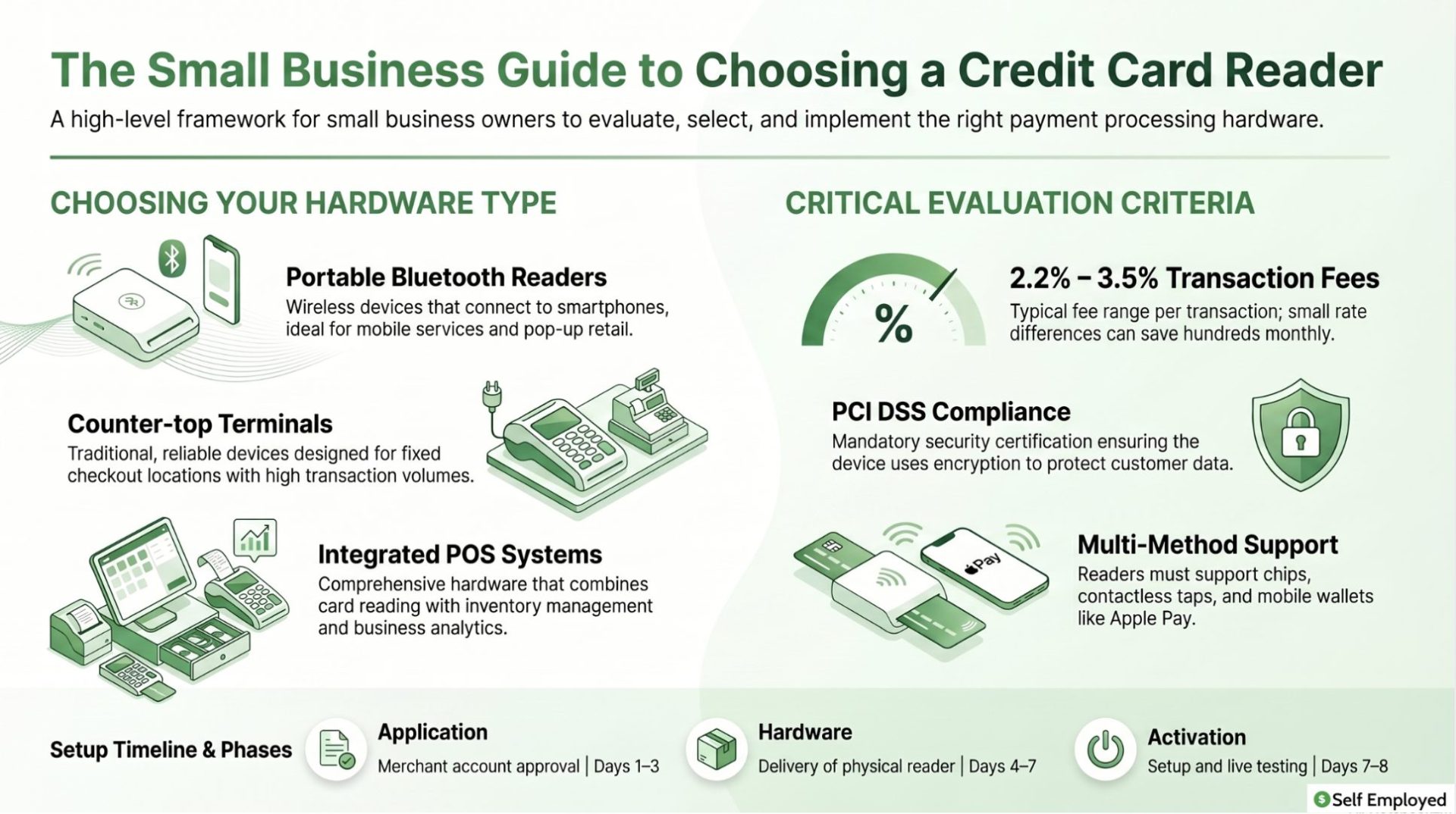
- Portable Bluetooth readers – These connect wirelessly to your smartphone or tablet and are ideal for mobile businesses, service providers, or pop-up retailers. I’ve seen freelancers and consultants use these with great success because they can accept payments anywhere.
- Counter-top terminals – Designed to sit at a fixed location like a checkout counter, these are more traditional but incredibly reliable. They typically have larger screens and keypads, making them suitable for higher transaction volumes.
- Integrated POS systems – These combine card reading with inventory management, customer tracking, and reporting. If you’re managing inventory or need detailed business analytics, this approach saves significant time.
- Smartphone case readers – These physical devices attach directly to your phone and read cards by swiping. While inexpensive, they’re generally slower and less secure than Bluetooth alternatives.
- NFC/contactless readers – These accept tap and mobile wallet payments, which have become increasingly important as more customers expect this option.
Key features to evaluate in a credit card reader for small business
When selecting a credit card reader for small business, several features directly impact your profitability and customer experience. From my experience, overlooking any of these can create frustrating situations down the road.
Transaction fees and pricing
This is where I see small business owners make their biggest mistakes. Transaction fees typically range from 2.2% to 3.5% per card transaction, plus sometimes a monthly fee. I worked with a retail shop owner who saved nearly $800 per month just by switching to a processor with better rates – and the reader itself worked identically.
Always request a breakdown of costs before committing:
- Per-transaction percentage
- Fixed per-transaction fee
- Monthly minimum or subscription
- Equipment costs
- Early termination penalties
Security and compliance
Your customers’ payment information is sensitive data. Any credit card reader for small business must be PCI DSS (Payment Card Industry Data Security Standard) compliant. This certification means the device meets industry standards for protecting card data.
In my years advising on this, I’ve seen how security breaches devastate small businesses – not just financially, but in customer trust. Ensure your reader uses end-to-end encryption and tokenization, which means the reader never actually stores the full card numbers.
Payment method support
Modern customers expect multiple payment options. Your credit card reader for small business should accept:
- All major credit cards (Visa, Mastercard, American Express, Discover)
- Debit cards
- Digital wallets (Apple Pay, Google Pay, Samsung Pay)
- Contactless payments
- ACH transfers
When I help small business owners choose readers, I always check this feature first. If your reader doesn’t support these methods, you’ll lose sales to customers who only carry digital payment methods.
Reliability and customer support
Your credit card reader for small business will occasionally have issues – that’s guaranteed. What matters is how quickly you can get support. I recommend choosing providers that offer:
- 24/7 customer support
- Multiple support channels (phone, email, chat)
- Hardware replacement guarantees
- Uptime guarantees documented in service agreements
Speed and efficiency
Transaction speed might seem minor, but after helping numerous retail businesses, I’ve learned it significantly impacts customer experience. A slow reader creates lines and frustration. Look for devices that complete transactions in under 5 seconds for standard cards.
Top credit card reader options for small business
Based on my experience working with various providers, here are the most reliable credit card readers for small business across different needs:
For mobile businesses and service providers
Square Reader and PayPal Here are the market leaders I see most often. Both offer portable Bluetooth readers that work with smartphones. Square charges 2.6% plus 10 cents per transaction for card payments, while PayPal’s rates are comparable. The advantage of Square is their ecosystem – their free Point of Sale app integrates perfectly with the reader.
I worked with a house cleaning service that switched to Square and immediately could invoice clients on-site. The convenience factor actually increased their same-day payment rate from 60% to 92%.
For retail locations
If you operate from a fixed location, consider devices like the Square Terminal or Clover Mini. These countertop readers handle higher transaction volumes more efficiently and provide a more professional customer experience.
The Square Terminal, for example, includes a built-in POS system, customer display, and receipt printer. The slightly higher equipment cost pays for itself through faster checkout and fewer customer complaints.
For full business management
Toast and Square’s full POS systems offer comprehensive solutions beyond just card reading. These integrate inventory management, employee scheduling, customer relationship management, and detailed reporting.
From my experience, small businesses with multiple employees or significant inventory benefit tremendously from these integrated systems. One shop owner I advised initially thought the higher cost wasn’t justified – but after six months of streamlined operations, she realized she’d saved twice the equipment cost through reduced errors and wasted time.
Integration with your business operations
A credit card reader for small business doesn’t exist in isolation. It needs to work within your existing systems. After helping numerous business owners through implementation, I’ve learned several critical integration points:
Accounting software connection
Your reader should automatically feed transaction data into your accounting system. If you’re using QuickBooks, Xero, or Wave, confirm your chosen reader integrates directly with it. This eliminates manual data entry and reduces bookkeeping errors.
I’ve seen small businesses lose hundreds in accounting accuracy just because they were manually entering payment data. The integration feature alone can justify choosing one reader over another that might have slightly lower fees.
Inventory and sales reporting
If you sell products, your credit card reader for small business should provide real-time inventory tracking. You should know immediately what’s selling and what’s sitting on shelves.
For self-employed business owners specifically, I’ve created a detailed guide on self-employed bookkeeping that covers how payment systems integrate with your financial tracking. Understanding these connections is crucial.
Multi-location capability
If you plan to expand to multiple locations, your payment system needs to scale. Some credit card readers for small business handle multiple locations seamlessly, while others require completely separate setups. This matters more than most owners realize when growth happens.
Security best practices for card reader use
Implementing a credit card reader for small business means becoming responsible for customer payment security. This isn’t optional – it’s legally required and ethically essential. From my experience advising on this, several practices separate responsible operators from those taking unnecessary risks:
Regular software updates
Your reader’s software must stay current. Security vulnerabilities are discovered regularly, and manufacturers release patches. I recommend enabling automatic updates whenever possible.
Employee training
If employees use your reader, they need training on proper card handling. Never let staff write down card numbers, photograph cards, or discuss card details. I’ve seen small businesses hit with fraud primarily because employees weren’t properly trained on card security.
Data storage practices
Your credit card reader for small business should never store full card numbers. Modern readers use tokenization – they replace the card data with a unique token. Ensure your system works this way.
Regular reconciliation
Compare your reader’s transaction log with your bank deposits weekly. Discrepancies usually indicate fraud or errors that need immediate attention.
Comparing credit card readers for your specific business
The best credit card reader for small business depends on your specific situation. I always walk business owners through these questions:
What’s your monthly transaction volume? A business processing $2,000 monthly will have very different needs than one processing $20,000.
Will you be moving between locations? Mobile operations need different solutions than fixed locations.
Do you need inventory management? Service businesses might not need POS features that retailers require.
What’s your technical comfort level? Some systems require more technical knowledge than others.
Do you need advanced reporting? Some owners want detailed analytics; others just need transaction records.
For more on choosing systems for small business operations, I recommend reviewing our small business POS systems buyers guide, which covers the broader context of payment and operations infrastructure.
Cost analysis and ROI calculation
Choosing a credit card reader for small business is a financial decision that deserves actual math. Let me walk you through how to calculate the real cost:
First, determine your annual transaction volume. If you process $100,000 in card payments yearly and your reader charges 2.6%, that’s $2,600 in fees. Add any monthly fees – say $30 per month is another $360. Total annual cost: $2,960.
Now consider the alternative – not accepting cards. How many sales would you lose? If even 5% of potential customers represent $5,000 in lost revenue, that’s drastically more than your reader costs.
From my experience, most small businesses break even on their reader investment within the first month just from the increased sales that accepting cards enables.
Implementation timeline and setup
Getting a credit card reader for small business operational is usually straightforward. Most providers handle the entire process:
Day 1-3: Apply for a merchant account. Most providers process applications within hours or a day.
Day 4-7: Receive your reader hardware if ordering physical devices.
Day 7-8: Complete setup and processing tests.
In my experience, the entire process from decision to processing live transactions takes about a week for most small businesses. Some providers can even get you operational in 24 hours.
Troubleshooting common credit card reader issues
After working with many small business owners, I’ve identified the most common problems with credit card readers for small business:
Connection problems: For Bluetooth readers, ensure your device has Bluetooth enabled and isn’t connecting to multiple readers simultaneously. Older reader batteries also fail – replacing them solves most Bluetooth issues.
Declined transactions: Most declines aren’t reader problems – they’re authorization issues from the bank or fraud filters. Contact your processor to understand decline reasons.
Slow processing: Check your internet connection first. For mobile readers, being too far from WiFi or cellular coverage slows transactions significantly.
Receipt printing issues: Paper jams and low paper are the most common culprits. Keep replacement paper handy.
Syncing problems: If transactions aren’t appearing in your accounting software, check that your integration is still active. Occasional reconnection is needed.
Future of credit card readers for small business
The payment processing industry continues evolving rapidly. In my conversations with payment industry experts, several trends are shaping the future of credit card readers for small business:
Increased mobile adoption: More processing happens through smartphones and tablets as the technology becomes more secure and seamless.
Faster settlement times: Traditional next-day deposits are becoming same-day or instant for many providers.
Enhanced security: Biometric authentication and AI fraud detection are becoming standard.
API-first design: Developers are building custom solutions using payment APIs rather than proprietary hardware.
For business owners starting out, I’ve assembled a guide on self-employment ideas that covers how payment infrastructure fits into various business models.
Making your final decision
Choosing the right credit card reader for small business comes down to balancing three factors: cost, features, and support quality. No single solution works for everyone.
My recommendation is to list your specific needs, get pricing from three providers, and ask for references from other small business owners using their systems. A fifteen-minute call with another business owner using a system can reveal issues that marketing materials hide.
Remember that switching providers later is possible but involves friction – data migration, retraining staff, and brief operational disruption. Getting the decision right initially saves headaches down the road.
Action steps for implementation
- Document your current payment processing method and pain points
- Calculate your estimated monthly transaction volume
- List required features for your business type
- Request quotes from your top three choices
- Ask for customer references and call them
- Start a free trial if available
- Complete implementation with provider support
- Train all staff on the new system
Frequently asked questions
What are the typical fees for a credit card reader for small business?
Most credit card readers charge between 2.2% and 3.5% per transaction, plus a per-transaction fee ranging from 10 cents to 30 cents. Some also charge monthly fees of $15-$50. Premium integrated systems may have higher costs but include additional features like inventory management.
Is it safe to accept credit cards with a small business reader?
Yes, when you choose a PCI DSS compliant reader. All major providers employ end-to-end encryption and tokenization, meaning your reader never stores full card numbers. Modern readers are actually more secure than traditional imprint machines from decades past.
How quickly do payments deposit into my business account?
Most providers offer next-business-day deposits. Some advanced providers now offer same-day or instant settlement, though you may pay a small fee for expedited deposits. Always confirm deposit timing before committing to a provider.
Can I use multiple credit card readers for my small business?
Yes, you can operate multiple readers under a single merchant account. This is common for multi-location businesses or those with both mobile and fixed operations. All transactions typically report to a single dashboard for consolidated reporting.
What happens if my card reader stops working?
Most major providers offer hardware replacement within 1-3 days. Some provide loaner devices while you wait for a replacement. Always verify replacement guarantees before choosing a provider – this support availability directly impacts your business continuity.
Do credit card readers work offline?
Some readers store transactions temporarily if your internet connection drops, then syncs them when connectivity returns. However, this is a backup feature, not a primary operating mode. For reliable card processing, you need consistent internet connectivity.


