

A point-of-sale (POS) system is essential for small businesses today. Whether you run a retail shop, restaurant, or service-based business, finding the best POS system for small business can transform how you operate. These systems do far more than process payments; they manage inventory, track sales, streamline operations, and provide valuable business insights. With numerous options available, understanding what to look for is crucial for making the right choice. This 2026 buyer’s guide will help you navigate the features and considerations necessary for selecting the best POS system that fits your unique business needs.
Key takeaways
- A POS system simplifies payment processing and inventory management for small businesses.
- Look for features such as customer management, reporting, and mobile capability that suit your business model.
- Consider scalability and ensure the system can grow with your expanding business.
- Integration with other business tools reduces manual work and improves efficiency.
- Reliable customer support is critical; choose a provider offering 24/7 assistance.
Understanding POS systems for small business
A point-of-sale system is the backbone of retail operations. These platforms handle payment processing, inventory tracking, customer management, and sales analytics. The best POS system for small business combines affordability with powerful features, allowing you to compete with larger enterprises without enterprise-level costs.
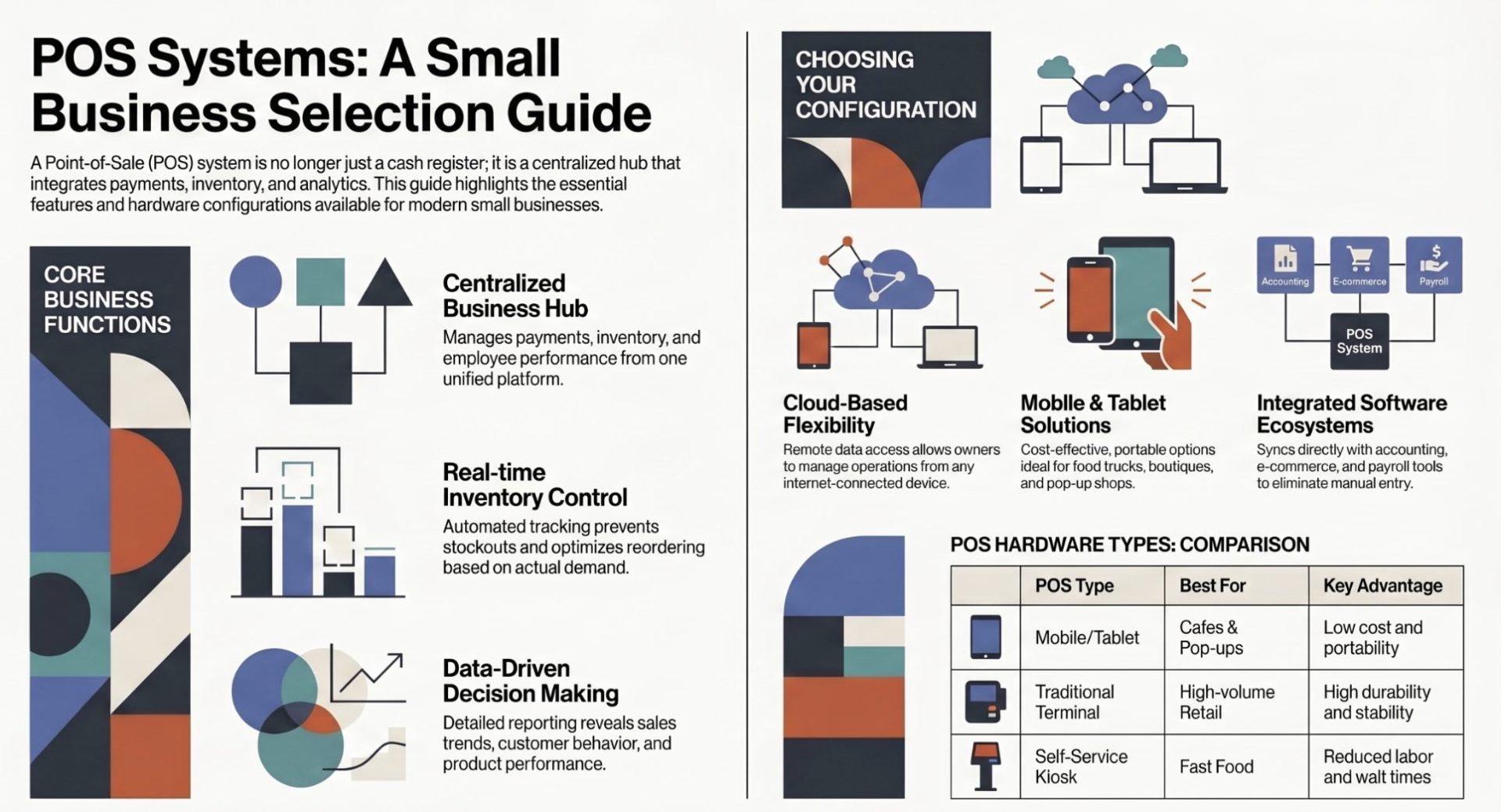
Modern POS systems function as integrated hubs for your entire business. Rather than juggling multiple separate tools, you can manage everything from one centralized platform. This consolidation saves time, reduces errors, and provides real-time visibility into your business performance.
Your POS system handles these core functions:
- Payment processing: Accepts cash, credit cards, debit cards, and mobile payments from customers.
- Inventory management: Tracks stock levels, automates reorders, and prevents stockouts.
- Sales analytics: Provides detailed reports on revenue, best-selling items, and customer trends.
- Customer management: Stores customer data, purchase history, and preferences for personalized marketing.
- Employee management: Records hours worked, manages schedules, and tracks performance metrics.
Why small businesses need a POS system
The best POS system for small business delivers several critical advantages. First, it establishes credibility and professionalism. Customers expect modern payment options and seamless checkout experiences. A robust POS system meets these expectations while protecting sensitive financial data.
Efficiency gains represent another major benefit. Manual processes like handwritten sales records, separate inventory sheets, and spreadsheet-based reporting consume valuable time. Your POS system automates these tasks, freeing you to focus on customer service and business growth. Employees complete transactions faster, reducing customer wait times and improving satisfaction.
Data-driven decision making becomes possible with comprehensive reporting features. You can identify your top-selling products, track seasonal trends, understand customer preferences, and optimize pricing strategies based on actual sales data rather than guesswork.
Consider these advantages:
- Credibility: Customers trust modern payment systems and transparent transactions.
- Efficiency: Automated processes reduce errors and accelerate checkout speed.
- Data insights: Detailed reports reveal what sells, when it sells, and why customers buy.
- Payment flexibility: Accept all major payment methods including digital wallets and contactless payments.
- Scalability: Your system grows with your business needs and revenue.
Essential features to evaluate
Selecting the best POS system for small business requires careful evaluation of specific features. Not every system offers the same capabilities, so prioritizing features that match your business model is essential.
Inventory management stands as a cornerstone feature. Look for systems that provide real-time stock tracking, low-stock alerts, barcode scanning, and automated reordering capabilities. This prevents overstocking while ensuring you never run out of popular items. Integration with your suppliers streamlines the ordering process.
Sales reporting and analytics help you understand your business performance. Comprehensive reporting should show daily, weekly, and monthly sales trends, product-level performance, employee sales metrics, and customer behavior patterns. Customizable reports let you focus on metrics that matter most to your business.
Customer relationship management (CRM) features build loyalty and repeat business. Your POS should store customer contact information, purchase history, preferences, and loyalty program status. This enables personalized marketing campaigns and targeted promotions that increase customer lifetime value.
Mobile capability represents a must-have feature for modern small businesses. Whether you operate a food truck, pop-up shop, or need to ring up sales anywhere in your store, mobile POS systems on tablets or smartphones provide flexibility and speed. They sync seamlessly with your main system to maintain unified data.
Employee management tools streamline HR operations. Track hours worked, manage schedules, assign tasks, and monitor performance all within your POS platform. This eliminates the need for separate time-tracking software and simplifies payroll processing.
Types of POS systems for different business models
Different business types benefit from different POS architectures. Understanding your options helps you choose the configuration that best serves your operations.
Cloud-based POS systems store all data on remote servers, accessible from any device with internet connectivity. These systems offer maximum flexibility and scalability. You access your entire operation from a smartphone, tablet, or computer, making remote management possible. Cloud systems typically charge monthly subscriptions and handle all software updates automatically.
Mobile POS systems run on smartphones and tablets, making them ideal for food trucks, market vendors, service providers who visit customers, and pop-up shops. Modern mobile systems rival traditional terminals in functionality while costing significantly less. They accept all payment types and sync with your central system in real-time.
Tablet POS systems balance mobility and functionality. A tablet mounted at your counter provides a modern, space-efficient alternative to traditional cash registers. Tablet systems work well for cafes, salons, boutiques, and other small retail spaces. They cost less than full terminal systems while offering comparable features.
Traditional POS terminals remain ideal for high-volume retail environments. These dedicated systems include integrated card readers, receipt printers, and displays. They handle hundreds of transactions daily without performance issues. Traditional terminals suit grocery stores, bookstores, and busy restaurants.
Self-service kiosks allow customers to place orders and complete payments independently. This reduces checkout wait times and labor costs. These work particularly well in fast-food restaurants, casual dining, and quick-service environments.
Software integration and ecosystem
The best POS system for small business functions as a central hub that connects with your other business software. Integration capabilities determine how efficiently your entire operation runs.
Your POS should integrate with accounting software like QuickBooks, ensuring financial data flows automatically from transactions to your books. This eliminates manual data entry and improves accuracy. Integration with e-commerce platforms like Shopify keeps inventory synchronized between online and physical stores, preventing overselling.
Payroll integration simplifies employee compensation. Hours tracked in your POS system automatically feed into payroll systems, reducing processing time and errors. CRM integration enables marketing automation, allowing you to send targeted promotions based on purchase history.
Look for these critical integrations:
- Accounting software: QuickBooks, FreshBooks, Wave.
- E-commerce platforms: Shopify, WooCommerce, BigCommerce.
- Inventory management: TradeGecko, Cin7, Ordoro.
- Payroll systems: ADP, Gusto, Rippling.
- Email marketing: Mailchimp, Constant Contact.
Payment processing options and security
Your POS system must securely process multiple payment types while keeping customer data protected. The best POS system for small business offers flexible payment options and enterprise-grade security.
Modern payment processing includes credit cards, debit cards, digital wallets (Apple Pay, Google Pay), and emerging options like buy-now-pay-later services. Processing multiple payment types increases customer convenience and can boost conversion rates, especially in competitive markets.
Security is non-negotiable. Your POS system should comply with Payment Card Industry (PCI) standards, the security framework governing payment processing. Look for these security features:
- End-to-end encryption: Protects data from point of sale to payment processor.
- Tokenization: Replaces sensitive card data with non-sensitive tokens.
- SSL certificates: Encrypts data transmitted between your device and payment servers.
- Regular security audits: Third-party testing identifies vulnerabilities.
Customer support and training
Even the most intuitive POS system occasionally requires support. The quality of customer support can significantly impact your experience and business operations.
Evaluate support availability carefully. Best-in-class providers offer 24/7 support via multiple channels including phone, email, and live chat. This matters because your POS failures directly impact revenue. A down system means you cannot process sales.
Response time and expertise matter equally. Some providers offer premium support with dedicated account managers who understand your business. Basic support through standard channels works for simple issues but may not suffice for critical problems.
Beyond reactive support, quality providers offer proactive training and resources. Look for video tutorials, webinars, comprehensive documentation, and knowledge bases. These resources help your team maximize system capabilities and resolve common questions independently.
Pricing models and total cost of ownership
Understanding the complete cost picture prevents surprise expenses and helps you make informed decisions. The best POS system for small business delivers value without breaking your budget.
Subscription-based models spread costs across monthly or annual payments. This approach works well for startups with limited capital. Monthly subscriptions typically range from zero to several hundred dollars depending on features and transaction volume. The downside is these costs accumulate over time; a $99 monthly system costs $1,188 annually.
One-time purchase models require substantial upfront investment but eliminate ongoing software fees. Hardware costs $2,000 to $5,000 for traditional systems, plus networking and setup expenses. Many businesses prefer this approach for better long-term value, especially if they plan to use the system for years.
Transaction fees add to total costs. Most payment processors charge 2.5 to 3.5 percent per card transaction, with additional per-transaction flat fees of $0.25 to $0.30. These fees typically flow to your payment processor rather than your POS provider.
Hardware costs vary significantly. A tablet POS system costs $300 to $700, while a comprehensive terminal setup including printers and cash drawers runs $1,500 to $3,000. Professional installation adds $200 to $500.
Making your decision
The best POS system for small business aligns with your specific operational requirements, growth plans, and budget constraints. Start by listing your must-have features. Does your business need inventory management? Multi-user access? Offline operation capability? Mobile functionality? Integration with specific software?
Next, compare solutions that meet your core requirements. Many providers offer free trials, allowing you to test systems with real transactions before committing. Leverage these trials to ensure the system feels intuitive for you and your team.
Read reviews from businesses similar to yours. What works perfectly for a retail boutique might not suit a restaurant. Focus on reviews addressing your specific business type and needs.
Consider your growth trajectory. A system suitable for your current size should handle 50 percent growth without major limitations. Scalability prevents costly migrations later.
For additional resources, check guidance from the Small Business Administration (SBA), which provides numerous articles on technology selection for small businesses. You may also find valuable insights from the National Retail Federation (NRF), which publishes research on retail technology trends.
Getting started with your chosen system
Once you select your system, successful implementation requires planning. Start by setting up your product catalog. Enter each item you sell with descriptions, prices, and SKUs. This foundational work ensures accurate sales tracking and inventory management.
Configure your tax settings according to local regulations. Different jurisdictions have varying tax rules, and incorrect setup can create compliance issues. Most POS systems guide you through this process.
Train your team thoroughly. Even intuitive systems require employee training to maximize capabilities. Invest time in walkthroughs, practice transactions, and Q&A sessions. Consider your training complete when employees feel confident handling typical and exceptional scenarios.
For growing your business further, explore resources at small business ideas and how to start a business to expand your offerings. Managing finances effectively is also crucial, so open a business bank account to keep personal and business finances separate. Understanding tax deductions will help reduce your tax burden. If you process payments, you may want to explore Square alternatives to find the best fit for your payment processing needs.
Common questions about POS systems
A POS (point of sale) system is hardware and software that processes customer transactions at the point where they purchase goods or services. Modern POS systems combine payment processing, inventory management, reporting, and customer data management into a single integrated platform.
A POS system accelerates transaction processing, eliminates manual inventory tracking, provides sales analytics and reporting, organizes customer data, and helps manage employee time and payroll. These capabilities improve efficiency while providing business insights that drive growth decisions.
Prioritize inventory management, sales reporting, customer management, payment processing options, and integration capabilities. Mobile functionality, employee management tools, and strong customer support also significantly impact your experience with the system.
Cloud-based systems offer flexibility, remote access, and automatic updates but require reliable internet. Traditional systems provide stability and offline operation but less flexibility. Your choice depends on your business model, budget, and technical requirements.
Subscription costs range from $0 to several hundred dollars monthly, while one-time purchases start around $2,000 for basic systems. Add hardware, payment processing fees, and potential implementation costs. Calculate your total cost of ownership over three to five years to compare options fairly.
Quality providers offer 24/7 support via phone, email, or chat. Look for providers with fast response times, knowledgeable staff, and comprehensive training resources including videos, webinars, and documentation.


