


When my co-host, Kate, and I launched our podcast, we had the same debate every new podcaster has: do we really need to turn on a camera, or is audio enough? We went with video, and it turned out to be the single best decision we made for the show. If you are weighing the same choice for your business in 2026, the evidence and our own experience point firmly in one direction. Audio is not dead, but a video podcast delivers everything an audio show does, plus the discovery, reach, and trust advantages that audio alone cannot match. A video podcast is simply a podcast recorded on camera.
It can be a split-screen remote conversation or a multi-camera studio production. The polish level is up to you. What matters is capturing video while you record, because that single choice turns one episode into a week’s worth of content across every platform your future clients use.
The Data Behind the Video-First Shift
The numbers here are not speculative. In early 2025, YouTube announced that it had passed 1 billion monthly viewers of podcast content, with more than 400 million hours of podcasts watched every month on living room TVs alone. Edison Research data now puts YouTube at roughly 33 percent of weekly US podcast listeners, ahead of Spotify at 26 percent and Apple Podcasts at 14 percent. The world’s largest podcast platform is a video platform.
Audience behavior backs this up. Research compiled by Backlinko shows that 53 percent of US podcast consumers prefer to watch a video podcast, while just 24 percent of weekly podcast newcomers want audio-only. Spotify has noticed: by late 2025, over 60 percent of its most popular shows offered video versions, and more than 240 million Spotify users have streamed a video podcast. We see the same pattern on our own dashboard. A majority of Carpool Confessions plays come through YouTube rather than audio apps. Launching audio only today means opting out of where podcast growth is actually happening.
One Recording Becomes a Content Engine
Record audio only, and you get one asset. Record a video podcast, and you get an engine. This is exactly how we run our podcast. The full episode goes up on YouTube. The audio track flows to Spotify, Apple Podcasts, and Amazon Music through our RSS feed. The transcript becomes a newsletter or blog post. The strongest 30- to 90-second moments become clips for YouTube Shorts, Instagram Reels, TikTok, and LinkedIn.
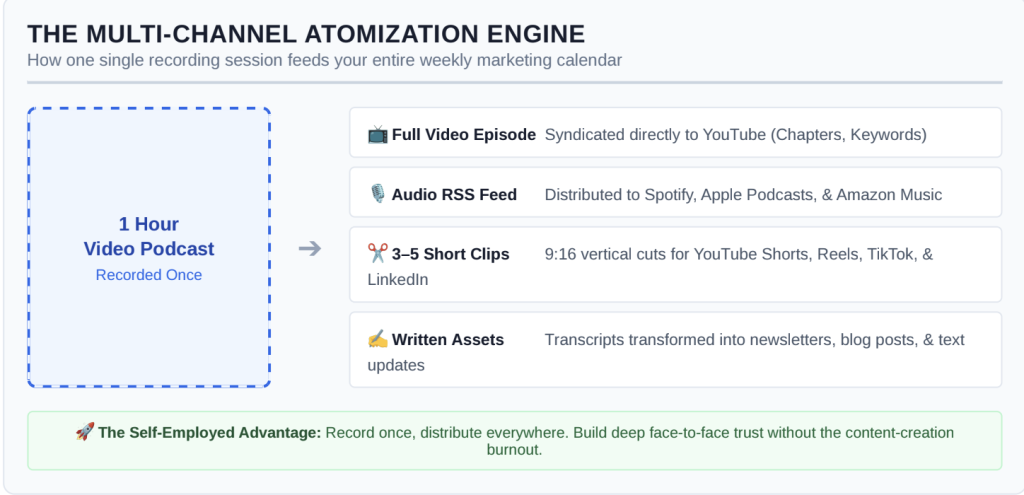
For self-employed people, this atomization is the whole game. Kate and I are the marketing department, the sales team, and the talent at the same time, and there is no way we could build separate content for five platforms every week. One recording session feeds our entire content calendar. The clips work because they are real moments from real conversations rather than scripted promos, and we have learned that an unplanned laugh or an honest disagreement between the two of us will outperform anything we try to engineer.
Video Builds Trust Faster Than Audio
Self-employment runs on trust. Clients hire consultants, coaches, designers, and freelancers they feel like they know. Audio builds that familiarity slowly; video compresses the timeline. We notice it constantly: people who find Carpool Confessions on YouTube talk to us like old friends the first time they reach out, because they have watched us react to each other for hours. When prospects can see your face, your reactions, and your body language, episode after episode, they arrive at the discovery call feeling as if the relationship already exists.
Video also unlocks distribution that audio cannot. Guests share episodes far more readily when there is a watchable, clippable version featuring their face. YouTube’s recommendation engine surfaces your show to viewers of adjacent channels. And because Google indexes YouTube content and frequently places video results at the top of search pages, a well-titled episode answering a question your ideal clients are Googling can outrank long-established blogs in your niche.
Syndicate Everywhere: The Tactical Workflow
Going video-first does not mean leaving audio listeners behind. Here is the blueprint we use for Carpool Confessions Podcast, including the technical details that tripped us up at the start:
Record with video; prioritize audio.
For those just starting out, your phone works perfectly fine for recording your podcast. You’ll split the audio out at the editing phase. The most important thing is having a very good mic, because your phone’s mic alone will not capture adequate audio. We have spoken with many creators, and the DJI Mic 3 is a popular choice for our needs.
If you’re more in-studio, try software like Riverside or StreamYard for remote sessions, since both record separate local tracks per speaker and protect you from connection glitches. Capture at 1080p minimum and 48kHz audio. A USB microphone like the Shure MV6 will outperform any camera mic and deliver high-quality sound without a huge investment.
Edit your video.
Most video editing software can split the audio and video into different tracks. We use Wondershare Filmora. Within the program, you can adjust the equalizer and use AI denoise (a big one for us on the road!).
Our podcast is more unscripted and “unedited,” so we aren’t as concerned with little imperfections. However, if you’re running a more interview-style podcast, you can run find and remove filler words to cut the ums and uhs in a single pass and edit the video by editing the transcript like a text document in tools like Descript.
- Publish the full episode to YouTube. Use a keyword-rich title under 70 characters, add timestamped chapters in the description starting at 0:00, and upload a 1280×720 custom thumbnail. YouTube can automatically create a transcript, but you can also have a little more control (in case of misunderstood words) by uploading your transcript as an SRT file.
- Export the audio for syndication. Export a 128 kbps or higher MP3 (or MP4) and upload it to a host like Buzzsprout or Transistor, which distributes to Apple Podcasts, Spotify, and Amazon Music from a single RSS feed. I like that we can just load the exported video, and both of these platforms will extract the audio.
- Cut three to five vertical clips. Export at 1080×1920 in 9:16. Keep faces and captions in the central safe zone, since TikTok and Reels overlay interface buttons along the right edge and bottom of the frame. Always burn in captions, because most short-form video is watched on mute.
We use Opus Clip to automate all of this and save a tremendous amount of time. Once we have our clips created, we use the platform to schedule out posts across all of our social media channels.
Repurpose the transcript
into a blog post, a newsletter section, or a series of LinkedIn posts. ArticleX is a really useful content repurposing tool that can connect directly to your YouTube or other streaming platforms and post directly to your website or LinkedIn.
Record once, publish everywhere. Each platform sends a slightly different audience back to the same show.
You Do Not Need a Studio
The most common objection to video is the perceived production burden, and we can tell you from experience that it is mostly myth. Carpool Confessions did not start in a studio or with some fancy camera. We record in a vehicle on our commute to work. A webcam or smartphone, a USB microphone, decent natural light, and a tidy background are enough to launch. Audiences consistently choose useful, honest conversations over cinematic lighting.
What actually kills shows is inconsistency, not bad lighting. Industry data shows the average podcast goes inactive after about 21 episodes, so a workflow you can sustain every week beats a perfect one you abandon by spring. Start simple, publish on schedule, and upgrade gear only once the show has earned it. We certainly did not buy better cameras until the show proved it deserved them.
Build the Foundation, Then Add the Camera
A video podcast is still a podcast at its core. The fundamentals come first: a clear concept, a defined audience, a sustainable format, and a realistic publishing schedule. The camera is a layer on top of that foundation, not a substitute for it. If you have not worked through those basics yet, start with this complete guide on how to start a podcast, which covers everything from choosing your concept and equipment to launching and growing your show.
With the foundation in place, adding video is a little more than pressing one extra record button. The marginal effort is small. The return is a show that lives on the world’s largest podcast platform, feeds into every social channel you use, builds face-to-face trust with future clients, and still reaches every audio listener on Spotify and Apple Podcasts. Take it from two people who learned it one episode at a time: if you build only one content asset this year as a self-employed professional, make it a video podcast.
Photo by Will Francis: Unsplash


