

Hi, I’m Elliot, and I’ve spent over a decade helping self-employed professionals manage their finances more efficiently. If there’s one thing I know for certain, it’s that choosing the right expense tracking app can save you hours every month and thousands of dollars in taxes. In 2025-2026, expense tracking apps have evolved dramatically with AI-powered automation that can extract data from receipts, categorize expenses automatically, and even predict tax deductions. This guide covers the best apps available today and helps you choose the one that fits your specific self-employment situation.
Why Expense Tracking Matters for Self-Employed Professionals
Self-employed professionals face a unique financial challenge: you must track every business expense to maximize tax deductions and understand your actual profitability. Traditional employees never think about this—their employers handle payroll and can itemize deductions. As a self-employed professional, every receipt represents potential tax savings.
Without proper expense tracking, you’re likely missing thousands in deductible expenses each year. You might forget about that business software subscription, the office supplies purchase, or the portion of your utility bill attributable to a home office. A good expense tracking app automates this process, capturing expenses as they happen and categorizing them correctly so nothing gets missed.
Beyond tax savings, expense tracking reveals crucial business insights. Which clients are most profitable? Which projects consume resources disproportionately? What expenses can you eliminate? This financial visibility allows you to make better business decisions and increase profitability.
The AI Revolution in Expense Tracking (2025-2026)
The biggest change in expense tracking apps over the past year is the integration of AI-powered automation. Modern apps no longer require manual entry of receipt details. Instead, AI analyzes receipt images, extracts relevant information (vendor, date, amount, product details), and automatically categorizes the expense into the appropriate tax category.
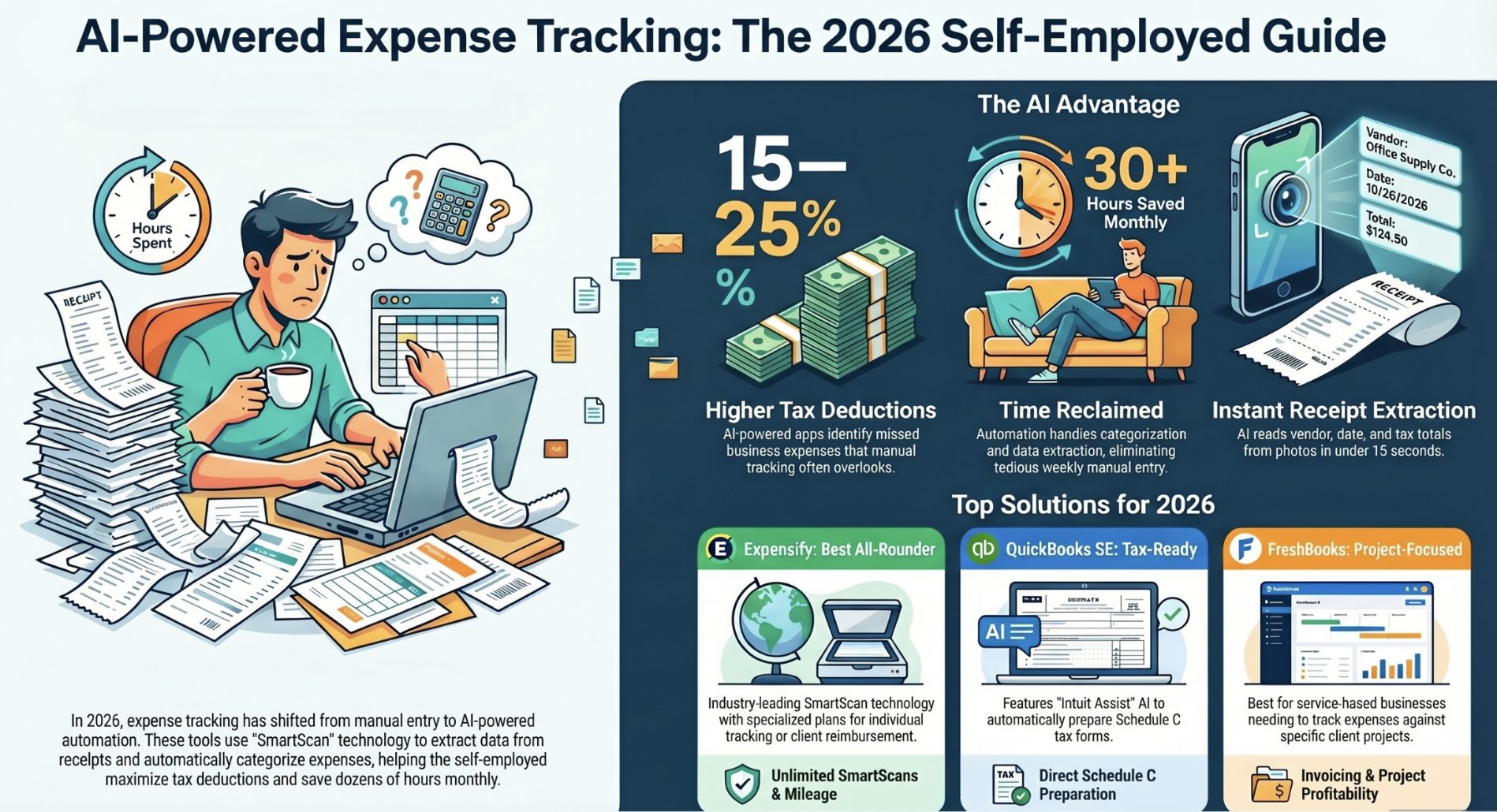
This automation saves tremendous time. Instead of spending 15-30 minutes weekly entering receipts manually, you simply photograph receipts as you receive them, and the app handles the rest. Over a year, this saves dozens of hours of tedious data entry.
The best AI-powered apps now include SmartScan technology that reads receipt images and extracts vendor names, dates, totals, and even tax information (for VAT/GST tracking). They learn your spending patterns and suggest appropriate categorizations for future expenses. Some apps even flag unusual expenses or spending patterns that might indicate errors or fraud.
Top Expense Tracking Apps for 2025-2026
Expensify consistently ranks as the best overall expense tracking app for small businesses and self-employed professionals. Its SmartScan technology is industry-leading for receipt capture and data extraction. The AI-powered system automatically reads receipt information and categorizes expenses with minimal manual intervention. For individual self-employed users, Expensify offers a “Track” plan at $5 per month that includes unlimited SmartScans, automatic mileage tracking, and expense categorization. For those needing to submit expense reports (common for freelancers who bill clients for reimbursable expenses), the “Submit” plan is $4.99 per month and automatically submits reports for reimbursement. The free plan includes 25 SmartScans monthly, which works for minimal expense users.
QuickBooks Self-Employed is specifically designed for independent contractors and self-employed tax filers. QuickBooks now features AI-Powered Intuit Assist that saves over 30 hours in business accounting per month by automating categorization, expense tracking, and tax preparation tasks. The platform tracks mileage automatically via GPS, categorizes bank transactions, and directly prepares your Schedule C tax form. Pricing is competitive for features offered, and integration with QuickBooks tax software makes year-end filing seamless.
FreshBooks simplifies expenses for freelancers and service-based businesses. The platform allows project-specific expense tracking, so you can see exactly which projects consumed which resources. This feature is particularly valuable for understanding project profitability. FreshBooks also includes invoicing, time tracking, and automatic client billing. Plans start at $17 per month, making it slightly more expensive than basic expense-only apps but offering broader functionality for complete business management.
Ramp combines corporate cards with automated expense tracking. The standout feature is that Ramp offers a free corporate card with their expense tracking software—you only pay transaction fees, not software fees. This makes it particularly attractive for self-employed professionals who want to use a card for business purchases and have those transactions automatically tracked.
ExpenseAI is a newer AI-powered expense tracking app that represents the cutting edge of automation. It extracts vital details like amount, merchant, tax information (GST, VAT), and even product details from receipt images. The app then automatically categorizes purchases into appropriate expense categories. ExpenseAI is particularly useful for self-employed professionals who handle international transactions or need precise GST/VAT tracking.
Key Features to Look For in 2026
When evaluating expense tracking apps, prioritize these features:
AI Receipt Scanning: The app should automatically extract data from receipt photos without manual data entry. Poor receipt scanning forces you back to manual entry, defeating the purpose of automation.
Automatic Categorization: The best apps learn your spending patterns and automatically categorize expenses correctly. Manual categorization is tedious and error-prone.
Bank Integration: The app should sync with your business bank account and credit cards, automatically pulling transactions. This ensures you capture all business expenses, even if you forgot to photograph receipts.
Mileage Tracking: For self-employed professionals who drive for business, automatic GPS-based mileage tracking is essential. The 2025 standard mileage rate is 67.5 cents per mile, and proper tracking can save hundreds annually.
Deduction Alerts: The best apps flag potential tax deductions you might miss. Some apps even estimate your overall tax liability based on current expenses and income.
Mobile-First Design: Since you’ll be tracking expenses on-the-go, mobile apps should be responsive and easy to use. Taking a photo of a receipt should be a 15-second process.
Tax Export Capability: Your expense tracker should easily export data in formats that accountants or tax software require. This eliminates having to re-enter data at tax time.
Comparing Pricing Models
Expense tracking app pricing typically follows these models: free plans (usually with limited features like 25 SmartScans monthly or single account access), monthly subscriptions ($4-$20 monthly depending on features), and annual subscriptions (usually offering 15-20 percent discounts).
For self-employed individuals, consider the cost-benefit. A $5 monthly app that saves you from missing $200 in deductions pays for itself instantly. Similarly, if an app saves you 5 hours monthly (valued at your hourly rate), it almost certainly pays for itself.
Some apps like QuickBooks Self-Employed bundle expense tracking with tax software, potentially saving money compared to paying separately for apps and tax preparation. Similarly, apps like FreshBooks that bundle invoicing and time tracking may provide better value than single-purpose apps.
Integration with Accounting Software
The best workflow integrates your expense tracker with accounting software. QuickBooks Self-Employed is integrated with TurboTax (Intuit’s tax software), meaning your tracked expenses automatically populate your tax return. Other apps integrate with Wave, Xero, or standalone accounting software.
If you work with a CPA or bookkeeper, verify that your chosen app exports data in formats they prefer. Some apps export directly to QuickBooks; others use CSV or PDF formats.
Getting Started with Your Chosen App
Once you’ve selected an app, set it up properly for maximum benefit. Start by creating your expense categories based on how you want to analyze your business. Most self-employed professionals use basic categories: income, home office, equipment, professional development, marketing, software subscriptions, and travel.
Connect your business bank account and credit cards for automatic transaction syncing. This is crucial; otherwise, you’ll revert to manual entry. Photograph or upload some historical receipts to teach the AI your spending patterns.
If your app includes mileage tracking, enable GPS-based automatic tracking. Otherwise, manually log business trips. Set up monthly reminders to review and categorize any uncategorized transactions.
Frequently Asked Questions
What’s the best expense tracking app for freelancers?
Expensify is excellent for freelancers due to its powerful SmartScan technology and project-based tracking. QuickBooks Self-Employed is ideal if you’re also handling tax preparation. FreshBooks is best if you need invoicing and time tracking alongside expense tracking.
Can I track mileage automatically with expense apps?
Yes, most modern apps including Expensify, QuickBooks Self-Employed, and FreshBooks offer automatic GPS-based mileage tracking. Simply enable it in settings and the app tracks your business trips in the background.
How much can I save using an expense tracking app?
A well-used expense tracking app typically helps self-employed professionals claim 15-25% more deductions than they would manually, easily translating to hundreds or thousands in annual tax savings depending on income level.
Do I need expensive accounting software or can I use a simple app?
Many self-employed professionals start with simple expense trackers like Expensify or QuickBooks Self-Employed. As your business grows and complexity increases (employees, inventory, etc.), you may move to more comprehensive accounting software.
What’s the difference between expense tracking and accounting software?
Expense tracking apps focus on recording transactions and categorizing expenses. Accounting software does that plus handles invoicing, client billing, profit and loss statements, balance sheets, and tax reporting. For most solo self-employed professionals, expense tracking apps suffice.
Can I use multiple expense tracking apps?
Technically yes, but it’s not recommended. Using one app ensures consistent categorization and prevents duplicate or missed expenses. Focus on finding one good app and using it consistently rather than splitting data across platforms.


